Claude Code is Anthropic's official agent for the terminal, VS Code / JetBrains, the desktop app and the browser. It understands your whole codebase, fixes bugs and writes tests across many files, handles multi-day migrations, runs commands, creates Git commits and connects to external tools through MCP.
Example: Claude Code connects to Codelux Gateway at codelux.io/v1/messages and uses anthropic / claude-sonnet-5. The same agent can switch between claude-sonnet-5, claude-opus-5-5, gpt-6-sol, DeepSeek-V41-Flash, kimi-k3, glm-5.3 and more.
How to use Claude Code with Codelux
About 10 minutes: install Claude Code → create a key in Portal → import it with CC-Switch (or edit settings.json) → start Claude Code and pick a model.
1. Install Claude Code
The native installer is recommended and updates itself in the background. Homebrew, WinGet and npm also work.
1Check system requirements
Item
Requirement
OS
macOS 13.0+ · Windows 10 1809+ / Server 2019+ · Ubuntu 20.04+ · Debian 10+ · Alpine 3.19+
Hardware
4 GB+ RAM, x64 or ARM64 CPU
Shell
Bash、Zsh、PowerShell、CMD
Network
Internet access; with Codelux, model requests go to Codelux
2Run the installer
Terminal
curl -fsSL https://claude.ai/install.sh | bash
PowerShell
irm https://claude.ai/install.ps1 | iex
A prompt like PS C:\ means you are in PowerShell; no admin rights needed. Installing Git for Windows is recommended so Claude Code can use its Bash tool.
CMD
curl -fsSL https://claude.ai/install.cmd -o install.cmd && install.cmd && del install.cmd
Terminal
brew install --cask claude-code
Homebrew installs don't auto-update; upgrade with brew upgrade claude-code.
PowerShell
winget install Anthropic.ClaudeCode
Terminal
npm install -g @anthropic-ai/claude-code
The npm package needs Node.js 22 or newer. Don't use sudo npm install -g.
3Verify the installation
Open a new terminal window and run:
Terminal
claude --version
claude doctor
You should see a version such as 2.1.211 (Claude Code). claude doctor checks the install and your settings files. If you get command not found, open a new terminal or follow the official install troubleshooting to fix your PATH.
2. Set Codelux as the provider
Claude Code connects to a gateway with ANTHROPIC_BASE_URL and ANTHROPIC_AUTH_TOKEN. CC-Switch writes them for you, or you can edit ~/.claude/settings.json yourself.
Pick a subscription plan or top up in Billing — any balance works for every agent.
Open API Keys in the left menu and click Create New Key. Give it a name you will recognise, such as the agent's name.
After it is created, copy the API key (starts with sk-) and the API base URL. The key is shown in full only once, so keep it somewhere safe.
5Install CC-Switch
CC-Switch is an open-source (MIT) desktop app that manages API providers for Claude Code, Codex, Gemini CLI, OpenCode and more. It writes the configuration files for you, so you don't have to edit them by hand. Requirements: Windows 10+, macOS 12+, or Linux x86_64/ARM64 with glibc 2.35+ and WebKitGTK 4.1 (e.g. Ubuntu 22.04+, Debian 12+).
Install with Homebrew (recommended):
Terminal
brew install --cask cc-switch
Or download CC-Switch-v{version}-macOS.dmg from Releases. It is a Universal build signed and notarized by Apple, so it runs on both Apple Silicon and Intel Macs.
Download CC-Switch-v{version}-Windows.msi (or the -Windows-Portable.zip portable build) from Releases and run it. On ARM Windows use the -Windows-arm64 files.
From Releases, download the .deb (Debian/Ubuntu), .rpm (Fedora etc.) or .AppImage for your architecture. For example on Ubuntu:
Terminal
sudo apt install ./CC-Switch-v*-Linux-x86_64.deb
On Arch Linux: paru -S cc-switch-bin.
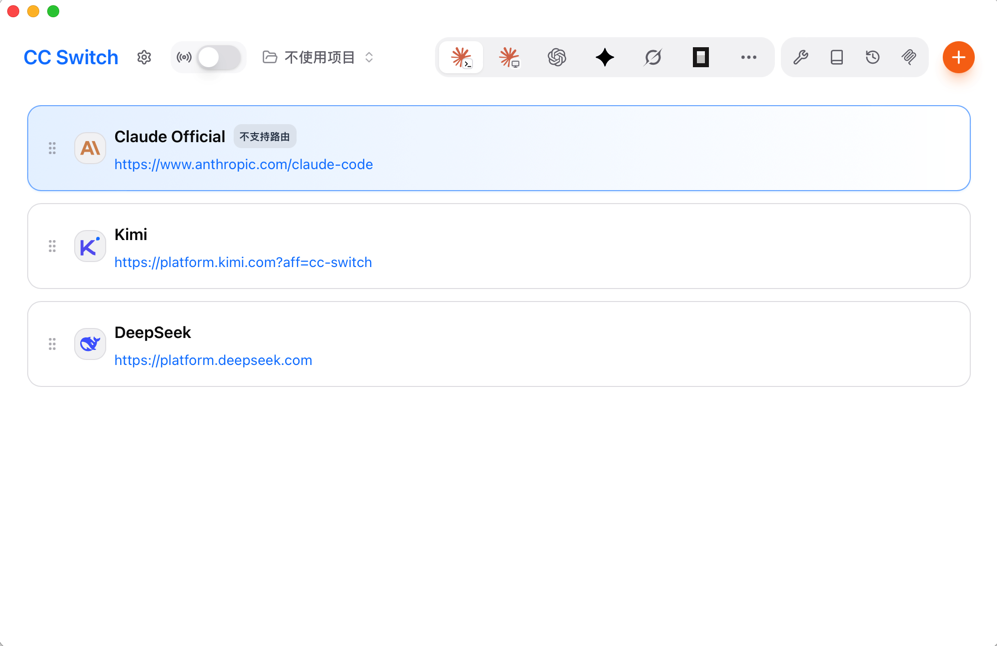
CC-Switch main window: pick the app at the top, then enable a provider; the orange + button adds a new one.
6Import Codelux into CC-Switch in one click
Keep CC-Switch running (it registers the ccswitch:// link handler on first launch).
In Portal, on the success page of the key you just created, find Import to desktop clients. It is only shown on desktop browsers.
On the CC-Switch card, set Target app to Claude Code, then click Import.
Your browser asks to open CC-Switch — allow it. CC-Switch shows a confirmation dialog with the provider name (Codelux), endpoint and key; confirm to add it.
In CC-Switch, switch to Claude Code at the top and make sure the Codelux provider is enabled.
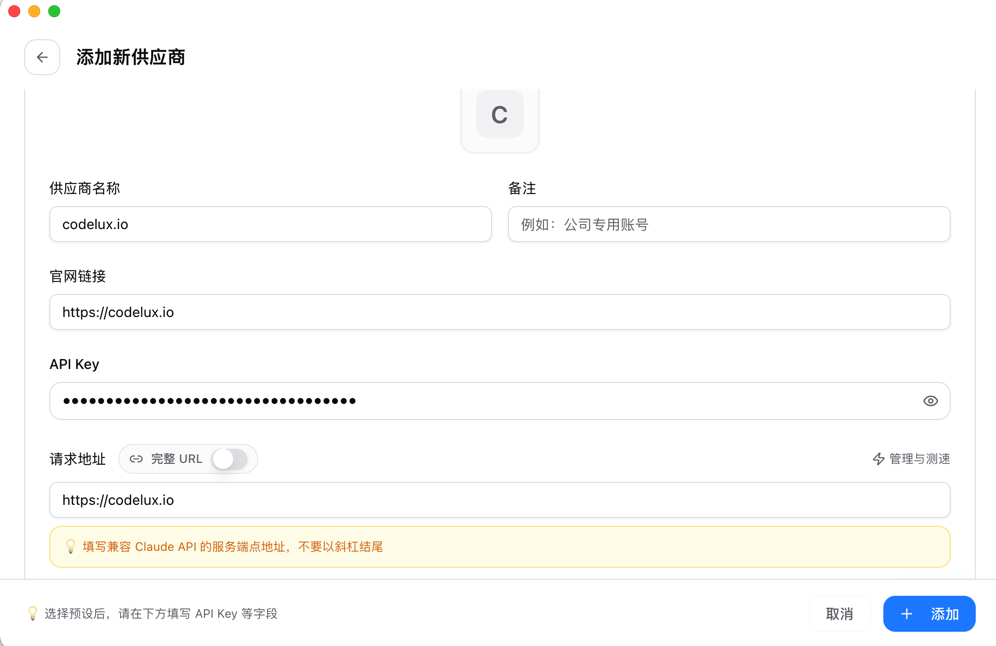
Prefer to add it by hand? In CC-Switch click the orange + → Custom, fill in Provider name (e.g. codelux.io), Websitehttps://codelux.io, your API Key and the Request URL (the Codelux API base URL, no trailing slash), then click Add.
Adding Codelux manually in CC-Switch. For Claude Code the request URL is the host only, without a trailing slash.
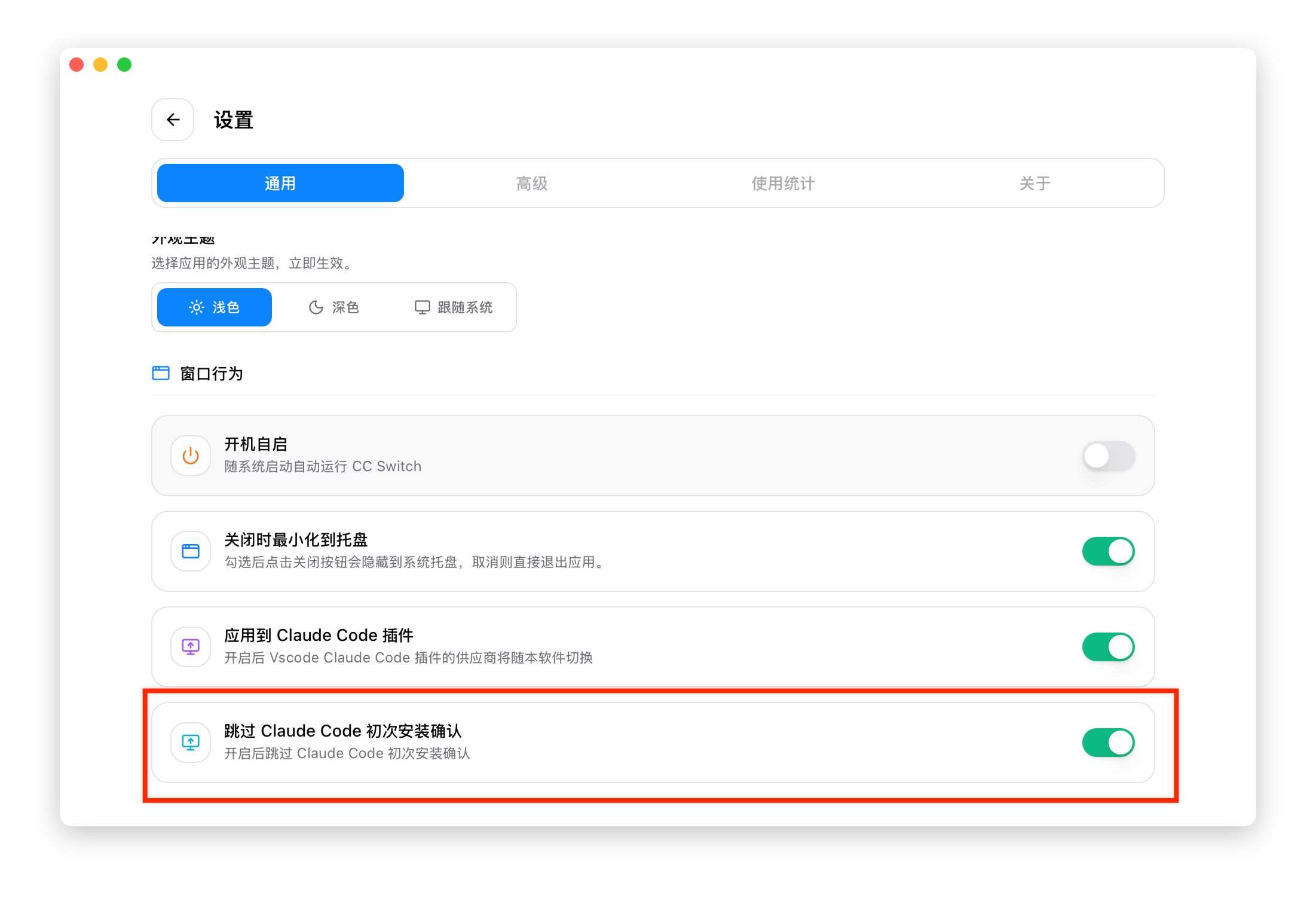
If Claude Code still asks you to log in or shows onboarding on first launch, turn on Skip Claude Code first-run confirmation in CC-Switch Settings → General and restart Claude Code. It writes hasCompletedOnboarding: true to ~/.claude.json.
The skip first-run confirmation switch in CC-Switch Settings → General. · CC-Switch 用户手册 (MIT)
7(Optional) Configure settings.json by hand
Without CC-Switch, add this env block to your user settings file so it applies to every project:
CC-Switch or ANTHROPIC_MODEL sets the default model; a /model choice is saved as the default for new sessions. The first request after a switch re-reads the conversation without cache.
11Everyday commands
Command
What it does
/init
Scan the project and create CLAUDE.md with project instructions
/status
Show the base URL, credential source and loaded settings
/model
Switch the model for this and new sessions
/compact
Summarize a long conversation to free context
claude -p "..."
Run a one-off task without the interactive UI (scripts and CI)
claude doctor
Diagnose install and settings problems
See the model, tokens and charge of every request in Portal → Logs.
FAQ
Claude Code still asks me to log in
Put ANTHROPIC_AUTH_TOKEN somewhere Claude Code reads before first-run setup: ~/.claude/settings.json or a shell export (a project .claude/settings.json is applied only after onboarding). With CC-Switch, turn on Skip Claude Code first-run confirmation.
I get a 401 error
The key is wrong, deleted, or in the wrong variable. Check it in Portal → API Keys, and make sure it is in ANTHROPIC_AUTH_TOKEN.
Requests fail with 404 or connection errors
ANTHROPIC_BASE_URL must be the host only, without /v1 or /v1/messages. Run the curl test above to check the address.
Can Claude Code use non-Claude models?
Yes. Set ANTHROPIC_MODEL or run /model glm-5.2 with any model ID from Portal → AI Hub; Codelux translates the request.
How do I use it in the VS Code extension?
Add the same variables to VS Code's user settings under claudeCode.environmentVariables, as described in the official gateway guide.
I see 400 errors mentioning unknown fields
Set CLAUDE_CODE_DISABLE_EXPERIMENTAL_BETAS=1 in the env block. It stops Claude Code from sending pre-release request fields.
 Claude Code